

Choosing the right keywords is an important part of improving your website’s visibility in search engines. However, finding good keywords is only the beginning. You also need to decide which keywords belong on which pages.
This is where keyword mapping becomes useful.
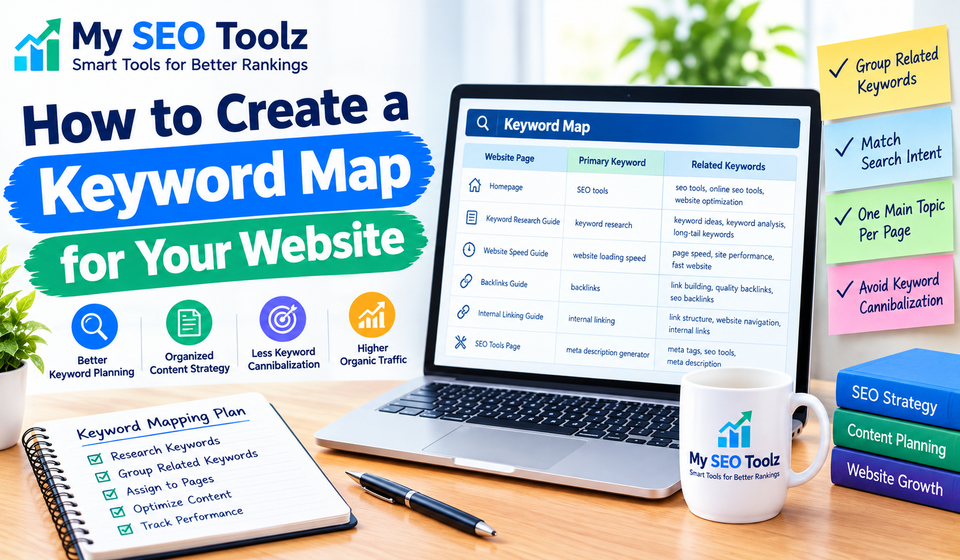
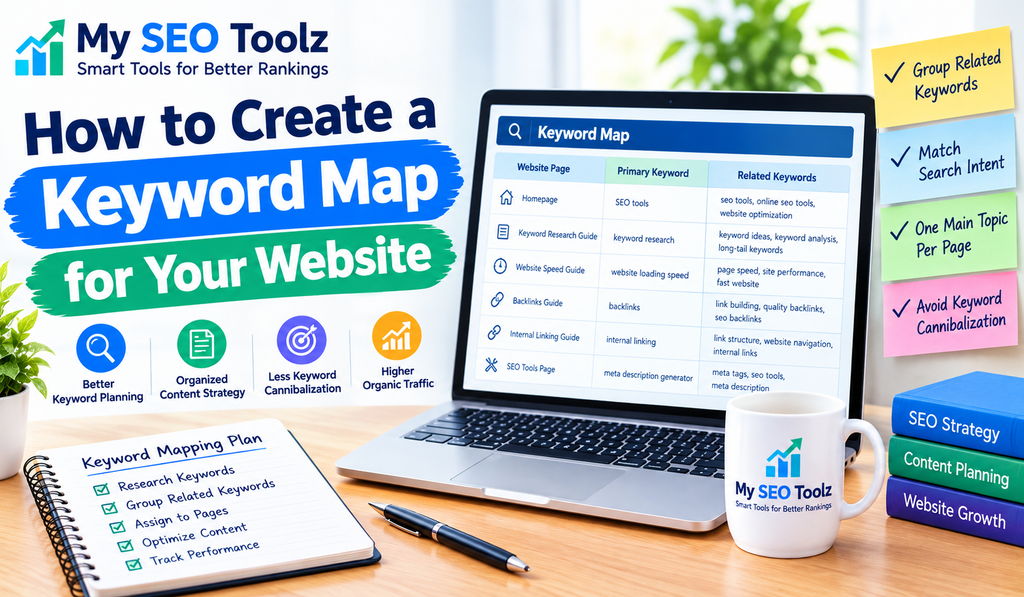
A keyword map helps you organize your target keywords and connect them to the most relevant pages on your website. Instead of targeting the same keywords across multiple articles, you can give every important page a clear purpose.
For example, if you run an SEO website, you might have separate articles about keyword research, website speed, backlinks, and internal linking. A keyword map helps you understand which keywords each article should target and how these pages fit into your overall content strategy.
In this guide, you will learn what keyword mapping is, why it matters, how to create a keyword map step by step, and which mistakes you should avoid.
What Is Keyword Mapping in SEO?
Keyword mapping is the process of assigning relevant search keywords to specific pages on your website.
The goal is to make sure that each page has a clear topic and targets a suitable group of related keywords.
For example, a website might organize its content like this:
- Homepage: SEO tools for website owners
- Blog article: keyword research for beginners
- Blog article: how to improve website loading speed
- Blog article: how to build quality backlinks
- Tool page: meta description generator
Each page serves a different purpose. Keyword mapping helps you identify that purpose and choose keywords that match the content.
A keyword map usually includes the page title, URL, primary keyword, related keywords, search intent, and page status.
You can create one using Google Sheets, Excel, or another spreadsheet application. You do not need expensive SEO software to get started.
Why Is Keyword Mapping Important?
Creating a keyword map can make your SEO work more organized and effective.
1. It Gives Every Page a Clear Purpose
Without a keyword map, you might publish several articles about similar topics without realizing that they overlap.
A keyword map helps you decide what each page should cover and which search queries it should target.
For example, one article might explain keyword research basics, while another focuses specifically on finding low-competition keywords.
Both articles can be useful when their purposes are clearly defined.
2. It Helps Reduce Keyword Cannibalization
Keyword cannibalization can happen when multiple pages target the same search intent and compete to satisfy the same query.
This does not mean that every repeated keyword is a problem. Several pages can naturally mention the same terms.
The concern is when multiple pages serve essentially the same purpose and make it difficult to determine which page should be the main resource.
A keyword map helps you identify overlapping pages and decide whether to differentiate, update, combine, or redirect them when appropriate.
3. It Improves Your Content Strategy
A keyword map makes it easier to identify which topics your website already covers and which topics still need attention.
You can organize your articles into topic groups and plan future content around relevant search queries.
For example, if your website covers keyword research but has no guide explaining keyword mapping, that could be an opportunity to create a useful supporting article.
4. It Supports Internal Linking
When you understand how your pages relate to one another, you can link them together more naturally.
For example, an article about keyword mapping can link to a guide about finding low-competition keywords. Readers who want to learn more can visit the related article.
Internal links also help search engines discover pages and understand relationships between your content.
You can learn more in our guide, How to Build an Effective Internal Linking Strategy.
5. It Helps You Track SEO Progress
A keyword map can also serve as a simple tracking document.
You can record which pages are published, which keywords they target, and which pages need updating.
When you review your website’s performance later, you will have a clearer understanding of how your content strategy is organized.
How to Create a Keyword Map for Your Website
Follow these steps to build a useful keyword map from scratch.
Step 1: List Your Existing Website Pages
Start by creating a list of the pages already published on your website.
Include important blog posts, landing pages, service pages, category pages, and useful tools.
For a WordPress website, you can find your posts and pages through the WordPress dashboard. You can also use Google Search Console and an appropriate website crawler to discover additional URLs.
Record the following information:
- Page title
- Page URL
- Content type
- Publication status
- Main topic
For example, My SEO Toolz already has articles about keyword research, website speed, backlinks, and internal linking. Each of these published articles can be included in the keyword map.
Starting with existing pages helps you avoid creating unnecessary duplicate content.
Step 2: Research Relevant Keywords
The next step is to identify keywords that people might use when searching for information related to your website.
You can begin with Google autocomplete, related searches, Google Search Console performance data, and keyword research tools.
Suppose your website publishes SEO guides. Relevant keyword ideas might include:
- keyword mapping
- keyword mapping for SEO
- keyword research for beginners
- low-competition keywords
- keyword clustering
- website keyword strategy
These phrases are related, but they may not all deserve separate articles.
Your job is to determine which phrases belong together and which represent different search needs.
For more guidance, read How to Find the Right Keywords for Your Website (Step-by-Step Guide).
Step 3: Understand Search Intent
Search intent means the reason behind a person’s search.
Before assigning a keyword to a page, consider what the searcher wants to accomplish.
There are four commonly used intent categories.
Informational intent: The person wants to learn something.
Example: “What is keyword mapping?”
Navigational intent: The person wants to find a particular website or page.
Example: “My SEO Toolz.”
Commercial investigation: The person is comparing products, tools, or possible solutions.
Example: “Best keyword research tools.”
Transactional intent: The person wants to complete an action, such as using a tool or making a purchase.
Example: “Free meta description generator.”
These categories can overlap, so check the actual search results when you are unsure.
A blog article generally suits an informational query, while a tool page may be more suitable for someone who wants to complete a specific task.
Matching keywords to the right page type makes your content more relevant to the audience.
Step 4: Choose One Primary Keyword for Each Page
Every important page should have a clear primary keyword or central topic.
This does not mean that a page can rank for only one keyword. A useful article can rank for many related searches.
The primary keyword simply helps you define the page’s main purpose.
For example:
Page title: How to Create a Keyword Map for Your Website
Primary keyword: keyword mapping
Related keywords:
- keyword mapping for SEO
- keyword map template
- keyword clustering
- website keyword strategy
These phrases can be covered naturally in the article where relevant.
Avoid forcing every keyword into the content. Readability and usefulness should come first.
Step 5: Group Related Keywords
Keyword grouping, sometimes called keyword clustering, involves organizing similar search queries into related groups.
For example:
| Keyword | Suggested page |
|---|---|
| keyword mapping | Keyword mapping guide |
| keyword mapping for SEO | Keyword mapping guide |
| keyword map template | Keyword mapping guide |
| how to find low-competition keywords | Low-competition keywords article |
| how to use long-tail keywords | Long-tail keywords article |
This is a starting point rather than a fixed rule. Before grouping keywords together, check whether their search intent and expected content are similar.
If two keywords require substantially different answers, they may deserve separate pages.
If they describe almost the same need, one comprehensive article may be enough.
Step 6: Create Your Keyword Map Spreadsheet
Now organize your research in a spreadsheet.
You can use the following template:
| Page title | Primary keyword | Related keywords | Page status |
|---|---|---|---|
| Keyword Mapping Guide | keyword mapping | keyword map template, keyword clustering | Planned |
| Low-Competition Keywords Guide | low-competition keywords | keyword difficulty, keyword research | Published |
| Website Loading Speed Guide | website loading speed | page speed optimization, website performance | Published |
| Internal Linking Guide | internal linking | internal link strategy, website navigation | Published |
These are illustrative entries. Use the actual URLs and publication status from your website when creating your own sheet.
For a more complete map, add columns for:
- Page URL
- Search intent
- Content type
- Target audience
- Search volume, when available
- Keyword difficulty, when available
- Last updated date
- Notes and next steps
Do not worry about collecting every possible metric at the beginning. A simple spreadsheet is enough to establish a clear structure.
Step 7: Review Existing Pages for Overlap
Once you have assigned keywords, look for pages that target very similar topics.
For example, imagine you have two articles titled:
- How to Find Keywords for Your Website
- How to Choose Keywords for Better SEO
If both articles answer essentially the same questions, you should review them carefully.
Possible solutions include:
- Give each article a distinct purpose.
- Expand one article to cover a specific missing topic.
- Combine overlapping content if one comprehensive page would serve readers better.
- Redirect an old URL when you intentionally replace or consolidate a page.
Do not combine pages simply because they share a keyword. Different search intents can justify separate articles.
Review actual content and search performance before making significant changes.
Step 8: Optimize Each Page for Its Assigned Keywords
After mapping your keywords, make sure the content matches the assigned topic.
Review the following elements:
Page title: Clearly communicate the topic and include the primary keyword naturally where appropriate.
Main heading: Tell readers what the page is about.
Introduction: Explain the topic and why it matters.
Subheadings: Organize the article into useful sections that answer related questions.
URL slug: Use a concise, descriptive address.
Meta description: Summarize the page accurately and encourage relevant visitors to click.
Internal links: Connect the page to related content on your website.
You can also use the Meta Description Generator on My SEO Toolz to help draft descriptions for your pages.
Remember that adding a keyword to every element is not necessary. Avoid awkward repetition and focus on creating content that meets the reader’s needs.
Step 9: Add Relevant Internal Links
Your keyword map can help you decide which pages should link to one another.
For example, your keyword mapping guide can link to your existing articles about:
- Finding low-competition keywords
- Using long-tail keywords to attract traffic
- Finding the right keywords for a website
- Building an effective internal linking strategy
Use descriptive anchor text that explains what the reader will find after clicking.
Avoid adding unrelated links just to increase the number of internal links. A small number of relevant links is more useful than a large number of unnecessary ones.
Step 10: Monitor Results and Update Your Map
Keyword mapping is not a one-time task.
As your website grows, you may publish new articles, update old pages, or discover new search opportunities.
Review your keyword map periodically and update it when your content changes.
Google Search Console can help you examine clicks, impressions, click-through rates, and average positions for your pages and queries.
Look for pages that receive impressions for relevant keywords but could benefit from clearer content, stronger internal links, or a better match with search intent.
Do not judge success by rankings alone. Relevant traffic, engagement, and whether visitors find what they need are also important considerations.
Common Keyword Mapping Mistakes to Avoid
Even a simple keyword map can become less useful if it is not maintained properly.
Targeting the Same Search Intent on Multiple Pages
Publishing several nearly identical articles can create unnecessary overlap.
Give each page a clear purpose and review existing content before planning another article on the same subject.
Ignoring Search Intent
A keyword may look attractive because it has high search volume, but the wrong page type may not satisfy the searcher.
Review the results and understand what people expect to find before choosing your content format.
Focusing Only on Search Volume
High-volume keywords can be competitive and may not bring the most relevant visitors.
Consider relevance, search intent, ranking difficulty, and your website’s ability to provide a genuinely useful answer.
Stuffing Keywords Into Content
Repeating the same phrase unnaturally can make an article difficult to read.
Use related phrases where they fit and explain the topic in natural language.
Forgetting to Update the Keyword Map
An outdated spreadsheet can lead to duplicate content plans and inaccurate page assignments.
Update the document whenever you publish, merge, redirect, or significantly revise a page.
Frequently Asked Questions
What is a keyword map in SEO?
A keyword map is a document that connects target keywords to specific website pages. It helps organize content, clarify each page’s purpose, and identify possible keyword overlap.
How do I create a keyword map for free?
You can use Google Sheets or Excel to list page titles, URLs, primary keywords, related keywords, search intent, and publication status. Google Search Console can provide performance information for pages that appear in Google Search.
How many keywords should one page target?
There is no fixed number. Start with one clear primary keyword and include relevant related phrases where they naturally support the topic. A page can rank for many related searches.
What is the difference between keyword mapping and keyword clustering?
Keyword mapping assigns keywords to specific website pages. Keyword clustering groups related search queries based on topic or intent. Clustering often helps you decide which keywords should be mapped to the same page.
Does keyword mapping improve Google rankings?
Keyword mapping does not guarantee higher rankings. However, it can help you organize relevant content, reduce unnecessary overlap, and make your website’s content strategy more consistent.
Should I create a separate page for every keyword?
No. Many related keywords can be covered on a single page if they share the same search intent. Create separate pages when they serve meaningfully different needs.
How often should I update my keyword map?
Review it whenever you publish new content or make major changes to existing pages. A periodic review, such as every few months, can also help you identify gaps and overlapping topics.
Conclusion
Keyword mapping helps you turn keyword research into a clear content plan. Instead of choosing keywords randomly, you can assign relevant search terms to suitable pages and give each article a specific purpose.
Start by listing your existing pages, researching keywords, understanding search intent, and grouping related phrases. Then build a spreadsheet, review overlapping topics, and add relevant internal links.
For a growing website, even a simple keyword map can make content planning easier and help prevent unnecessary duplication.
If you are building your SEO knowledge, combine keyword mapping with keyword research, internal linking, and regular content reviews. These practices can help you create a more organized website that serves readers and search engines effectively.